Gitlab CI/CD
Example Template
stages:
  - build
  - deploy

build_job:
  stage: build
  image: image:version
  script:
    - install dependencies
    - run build command
  artifacts:
    paths:
      - output_directory/
    expire_in: duration
  rules:
    - if: '$CI_COMMIT_BRANCH == "branch-name"'
      changes:
        - path/to/watched/files/**/*
    - when: never

deploy_job:
  stage: deploy
  tags: [runner-tag]
  script:
    - copy build artifacts
    - reload service
  rules:
    - if: '$CI_COMMIT_BRANCH == "branch-name"'
      changes:
        - output_directory/**/*
    - when: never
stages
Defines the order in which jobs run. Jobs in the same stage run in parallel.
build_job
A job name. Can be anything — choose something descriptive.
stage
Assigns the job to a stage. Pipeline flows stage → stage.
image:version
Docker image used to run the job. Examples: python:3.12, node:20, alpine:latest.
script
Commands executed inside the job. This is the core of what the job does.
install dependencies
Placeholder for dependency installation.
Examples:
pip install -r requirements.txt, dnf install -y zip
run build command
Placeholder for your build step.
Examples: mkdocs build, npm run build, python build.py
artifacts
Files saved after the job finishes. Used by later jobs or downloadable from GitLab.
output_directory/
Folder containing build results. Examples: dist/, site/, build_output/.
duration
How long GitLab keeps artifacts. Examples: 1h, 3 days, 1 week.
rules
Controls when a job should run. Modern replacement for only/except.
if: '$CI_COMMIT_BRANCH == "branch-name"'
Runs the job only on a specific branch. Common values: main, master, develop.
changes
Runs the job only if certain files changed. Prevents unnecessary pipelines.
when: never
Default fallback: If no rule matches → job does NOT run.
tags
Selects which runner executes the job. Examples: shell, docker, prod-runner.
runner-tag
Placeholder for your runner’s tag.
example deploy script
copy build artifacts, reload service
Example CI/CD
CI/CD for my mkdocs
stages:
  - build
  - deploy

build-mkdocs:
  stage: build
  image: python:3.12
  script:
    - pip install mkdocs-material
    - cd matywaky-mkdocs
    - mkdocs build -c
  artifacts:
    paths:
      - matywaky-mkdocs/site
  rules:
    - if: '$CI_COMMIT_BRANCH == "main"'
      changes:
        - matywaky-mkdocs/**/*
    - when: never

deploy:
  stage: deploy
  tags: [shell]
  script:
    - TIMESTAMP=$(date +%Y-%m-%d_%H-%M-%S)
    - mkdir -p /var/www/mkdocs/releases/$TIMESTAMP
    - cp -r matywaky-mkdocs/site/* /var/www/mkdocs/releases/$TIMESTAMP/
    - rm -f /var/www/mkdocs/current
    - ln -s /var/www/mkdocs/releases/$TIMESTAMP /var/www/mkdocs/current
    - restorecon -Rv /var/www/mkdocs
    - sudo systemctl reload nginx
  rules:
    - if: '$CI_COMMIT_BRANCH == "main"'
      changes:
        - matywaky-mkdocs/**/*
    - when: never
Pipeline structure
The pipeline consists of two stages:
- build — generates the MkDocs static site
- deploy — publishes the generated site to the server
build-mkdocs job (build stage)
This job performs the following actions:
- Starts a Python environment
(image: python:3.12) - provides Python and pip inside the job. - Installs MkDocs Material
(pip install mkdocs-material) - prepares the MkDocs theme and tooling. - Moves into the documentation directory
(cd matywaky-mkdocs) - Builds the static documentation site
(mkdocs build -c) - outputs HTML files into matywaky-mkdocs/site. - Stores the generated site as artifacts
(artifacts.paths: matywaky-mkdocs/site) - makes the built files available to the deploy job. - Runs only when appropriate
Controlled by rules:- only on the main branch
- only when files under
matywaky-mkdocs/**/*have changed - otherwise - when: never prevents execution
This avoids unnecessary builds.
deploy job (deploy stage)
This job performs:
- Execution on a shell runner
(tags: [shell]) - the job runs directly on the target server. - Creation of a timestamped release directory
(/var/www/mkdocs/releases/$TIMESTAMP) - each deployment becomes a separate version. - Copying the built site into the new release
(cp -r matywaky-mkdocs/site/* ...) - deploys the freshly generated HTML files. - Updating the current symlink
(ln -s /var/www/mkdocs/releases/$TIMESTAMP /var/www/mkdocs/current)- switches the live site to the new version atomically. - Restoring SELinux contexts
(restorecon -Rv /var/www/mkdocs) - required on SELinux-enabled systems. -
Reloading Nginx
(systemctl reload nginx) - makes the new version available immediately. -
Execution only when relevant
Same rule logic as the build job:- only on main
- only when documentation files changed
- otherwise - job is skipped
Runners
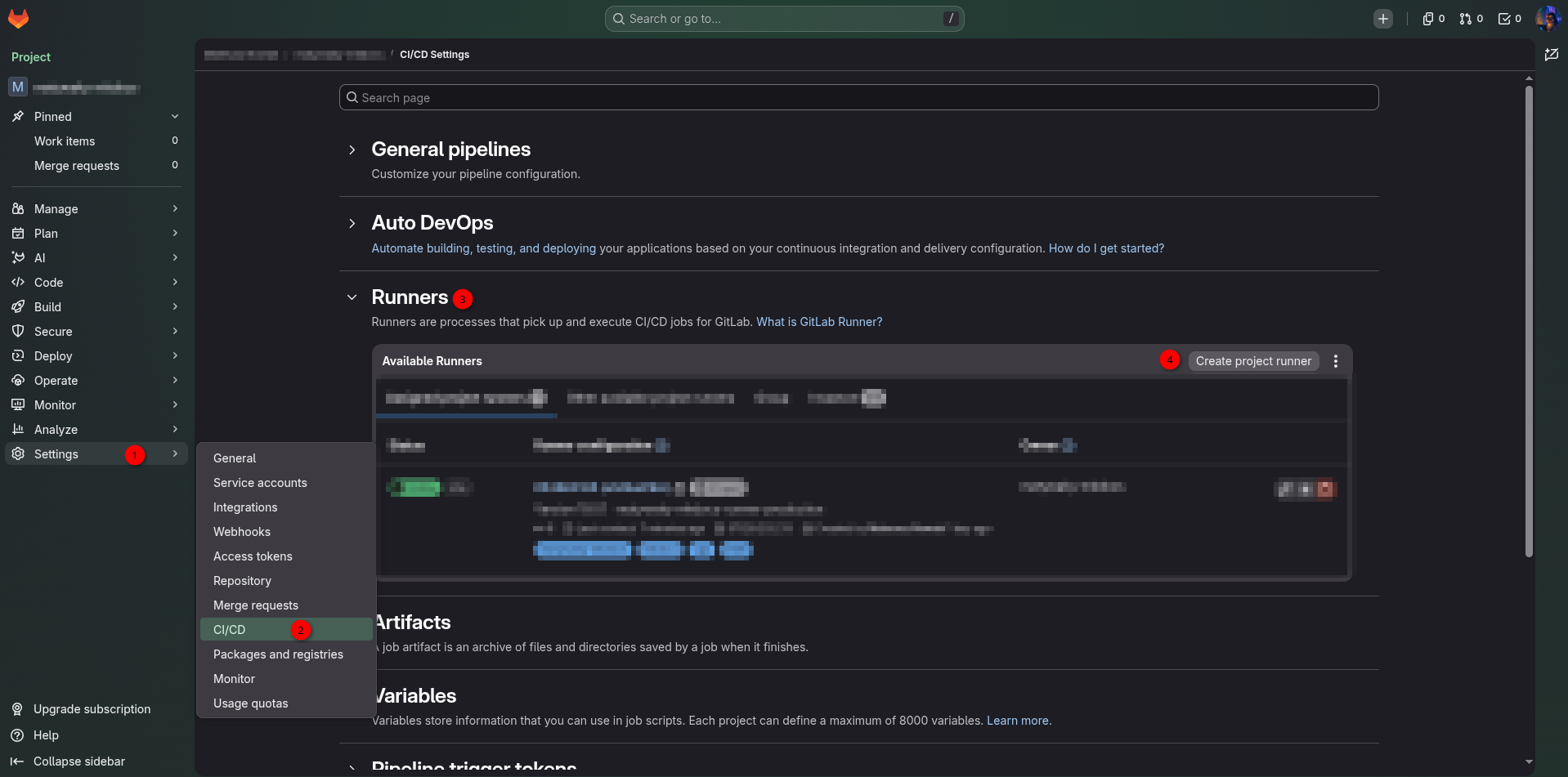
Create runner
To create new runner follow steps on image down
Configure runner
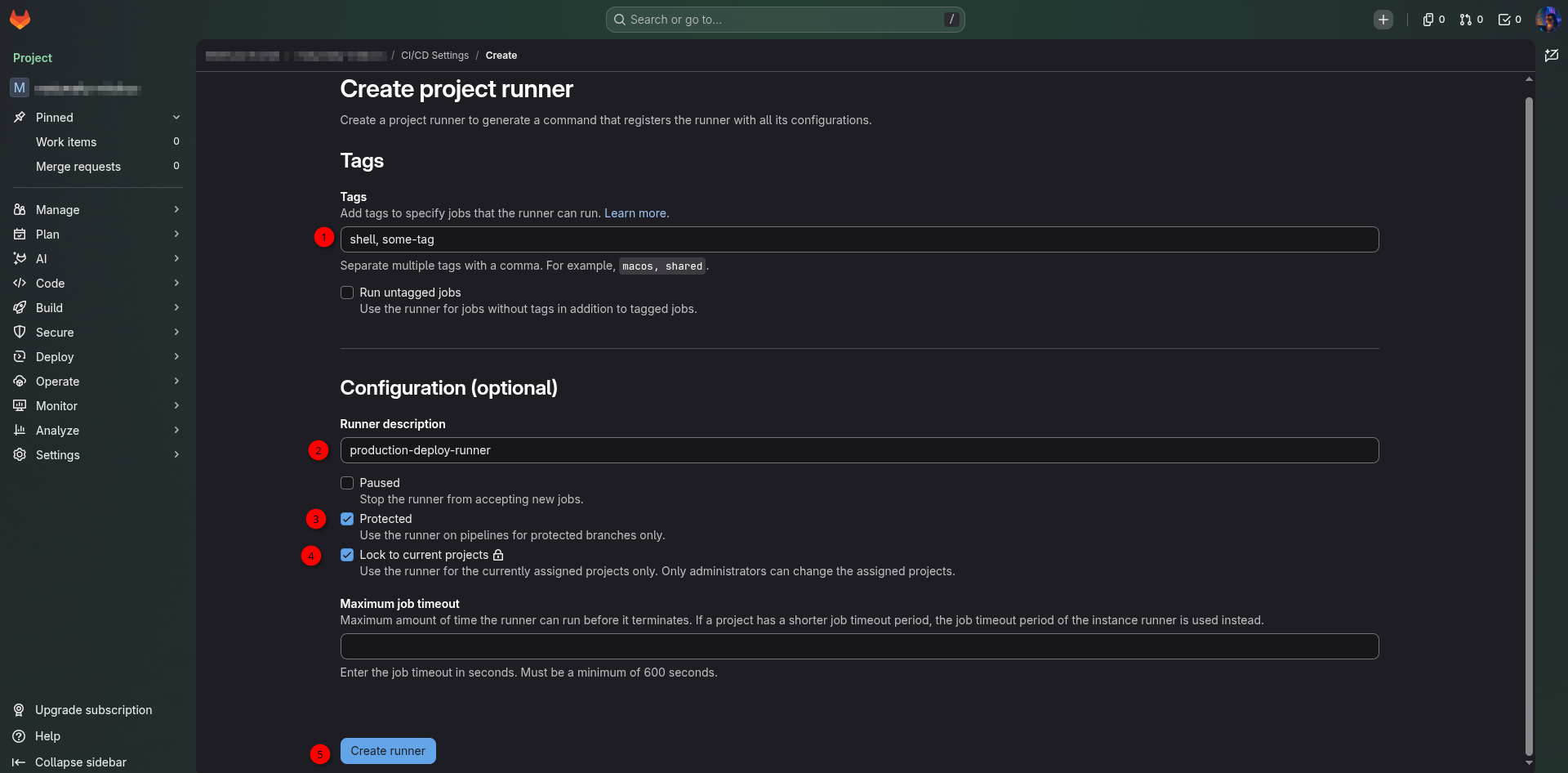 Tags
Tags
Tags define which jobs a runner is allowed to execute.
- Jobs specify tags in their configuration (tags: [shell])
- Runners also have tags assigned to them
- GitLab matches jobs to runners based on tag overlap
Purpose: To control where jobs run (e.g., Docker runner, shell runner, production runner).
Runner Description
A human‑readable label for the runner.
- Has no functional impact
- Used only for identification in the GitLab UI
Protected
A protected runner can only execute jobs from protected branches or protected tags.
Effect:
- Jobs from main, master, release/* → allowed
- Jobs from feature branches → blocked
Purpose:
To ensure that runners with access to sensitive environments (e.g., production servers) do not run untrusted code.
Lock to current project
Determines whether the runner is:
- shared — available to multiple projects
- locked — available only to the current project
Purpose:
To prevent other projects from using a runner that has access to sensitive resources or infrastructure.
Register runner
Install runner
Follow instruction on https://docs.gitlab.com/runner/install/
In my case (RedHat Linux VM):
curl -L "https://packages.gitlab.com/install/repositories/runner/gitlab-runner/script.rpm.sh" -o script.rpm.sh

less script.rpm.sh

sudo bash script.rpm.sh

sudo dnf install gitlab-runner
Register runner
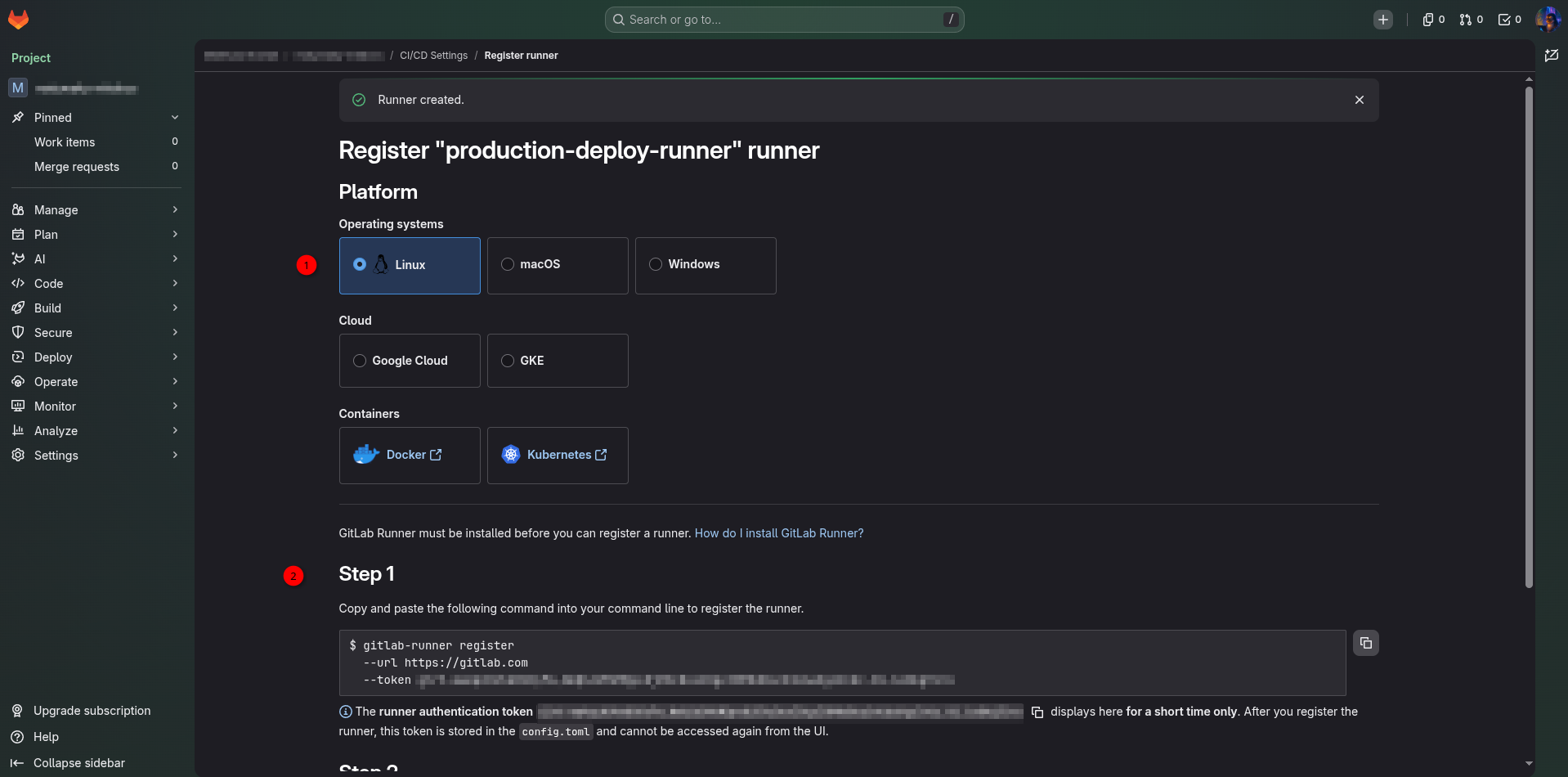
1 - choose OS
2 - copy to machine with runner
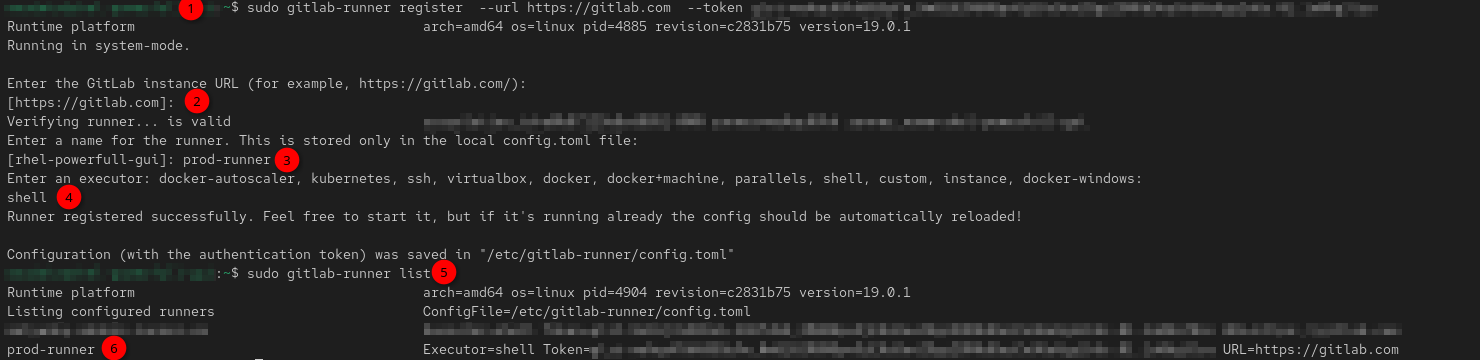
1 - copy command from GitLab UI and run it with sudo
2 - for GitLab.com - press Enter to accept the default
3 - human‑readable label for the runner
4 - VERY IMPORTANT! This defines how the runner will execute CI/CD jobs (shell - runs jobs directly on the machine)
5 - check list of the runners